Tell us what you want help with
Lead Finder exists for one reason: dorks, maps and real buyers.
Subscriptions, learning, money skills, email, selling, websites and more. No password or payment details here.
Create your free account
Right here — no card, no separate page. Start the task in the box above once you're in.
Free to start · no card needed · you always log in to other sites yourself. We never ask for your passwords, card numbers or ID. Full sign-up page
Learn everything, do anything online
(No education required)
Imagine if the thing you keep postponing got done today.
You don't need another course. You need the thing done — and to understand how, so you never need help with it again. Bring the subscription, the sending setup, the listing, the release, the app. We research it, show you real options and prices, then do it with you in the Magic Box you control.
Watch the full demo and see how it works
Works on the sites you already use
Site names are examples of websites people ask for help with. No partnership or affiliation is implied.
Everything inside
One Magic Box. Every module.
Pick the room you need today: school, money, the Word, dating, social, leads, launches, referrals or a finished task.
School
67 classes, beginner to expert
Money school
Problem, offer, price, first sale
Business starter
Location, product and launch plan
Personal assistant
Flights, news and live checks
Work for me
It does the job and teaches you as it goes
Lectures
How to do it, step by step, with the prompt
Lounges
Live rooms per model: video, screen share, chat
Tutorial Studio
Record once, publish to every platform
Betting Lab
Real odds, real cost, scam checker
Lessons
Step-by-step task library
Skills marketplace
250 outcomes you can ask for
Word Trainer
Bible and Quran memory drills
Dating & Connection
Profiles, conversation, safety
Languages
Words, listening and speaking
Demo Studio
Product videos and recordings
Platform Help
300 platforms, every common problem
Funding Finder
Grants, loans, investors and competitions
Immigration & paperwork
Visa routes, documents and official sources
Homework coach
Kindergarten to PhD, every homework type
Social Studio
Accounts, replies, DMs and leads
Lead Finder
Dorks, maps and enrichment
Launch Studio
Web, Android, iOS and stores
Software app builder
Plan and build a web or mobile app
Business Tutor
Train your team on your own platform
Certification
Marked assessment and a verifiable certificate
Progress
What you studied, finished and proved
Sources
Where the facts come from
Referrals
30% for life
Pricing
All modules, one plan
Ask the Magic Box
Start with any task
Install the app
Keep it on your home screen
Works on Android and iPhone — no app store, no download page. It opens full screen and keeps working when the signal drops.
Inside the product
Real screenshots. Not a mockup.
The brief, the Magic Box and the admin console, exactly as they look while a task is being done.
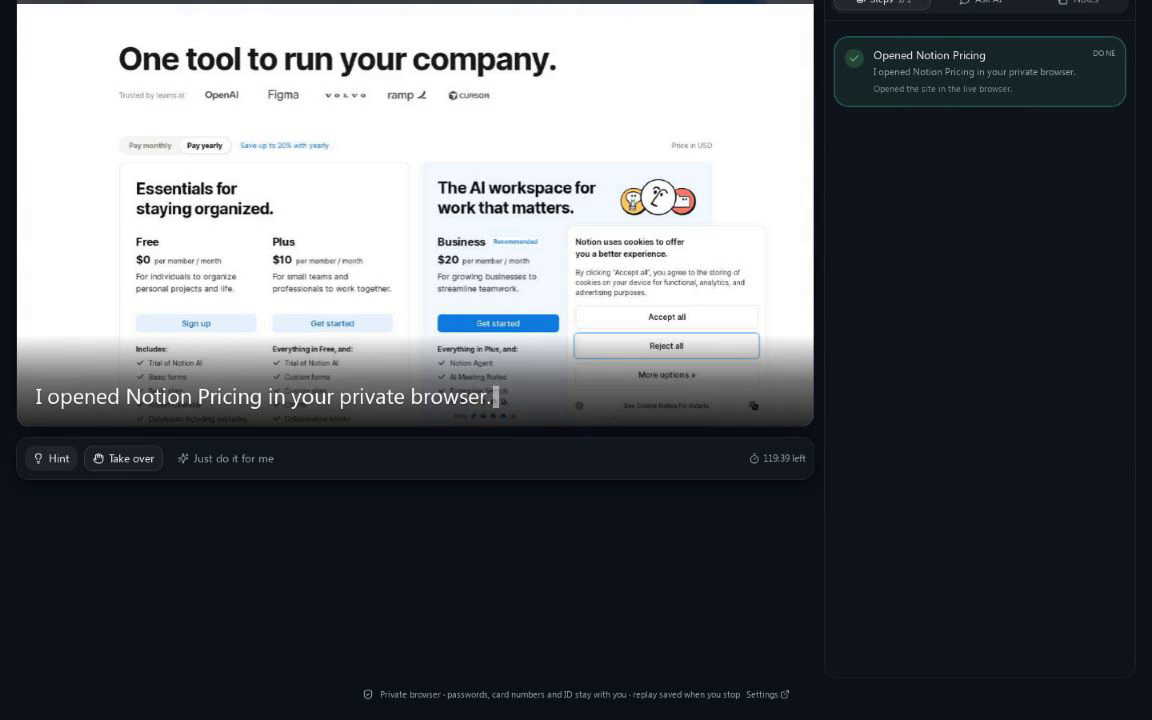
The Magic Box is actually doing it
A live Notion pricing task, with the step it just clicked, the page link and the recording running.
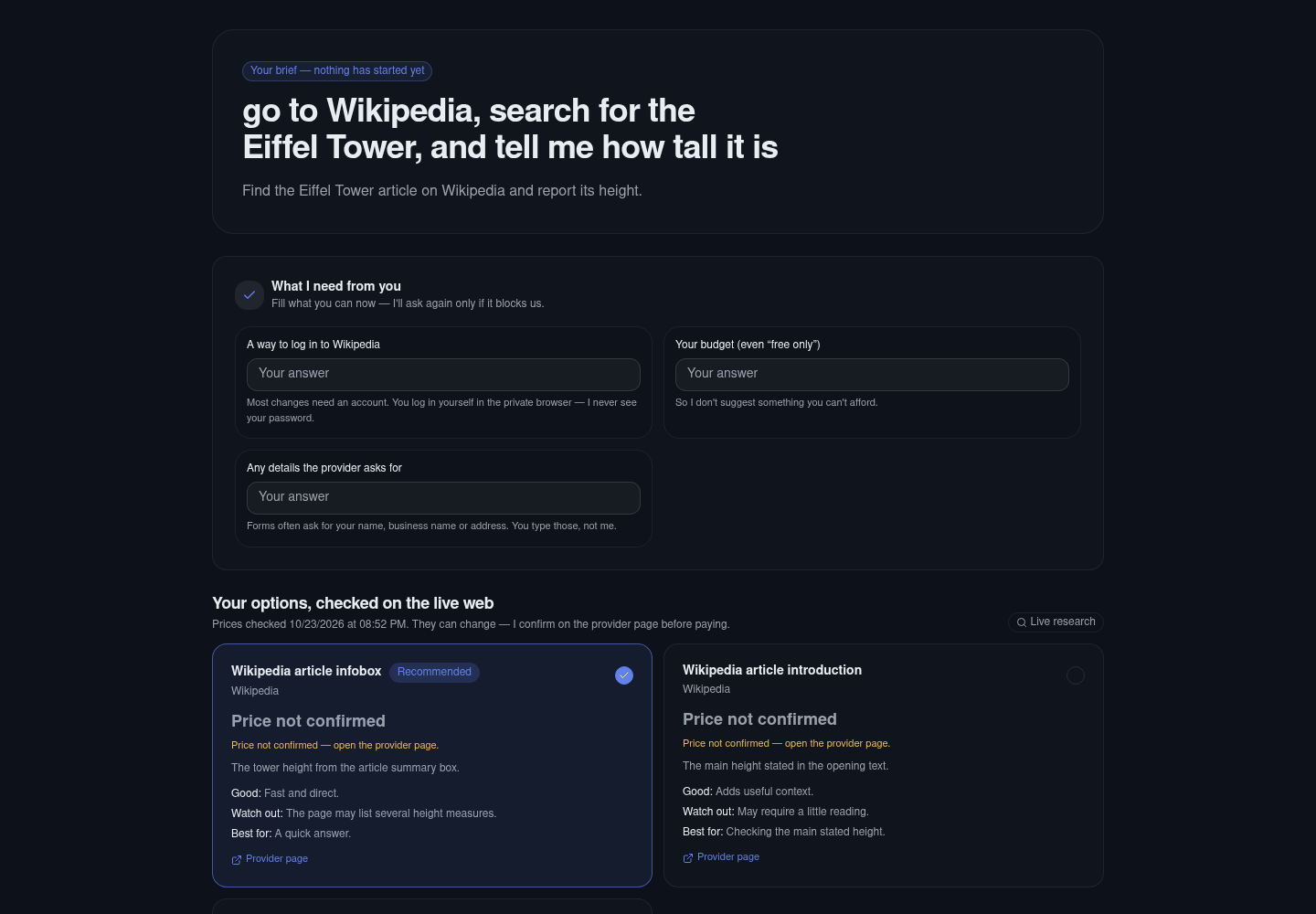
A brief you can understand
What I need from you, real options and prices, and the recommendation — before anything opens.
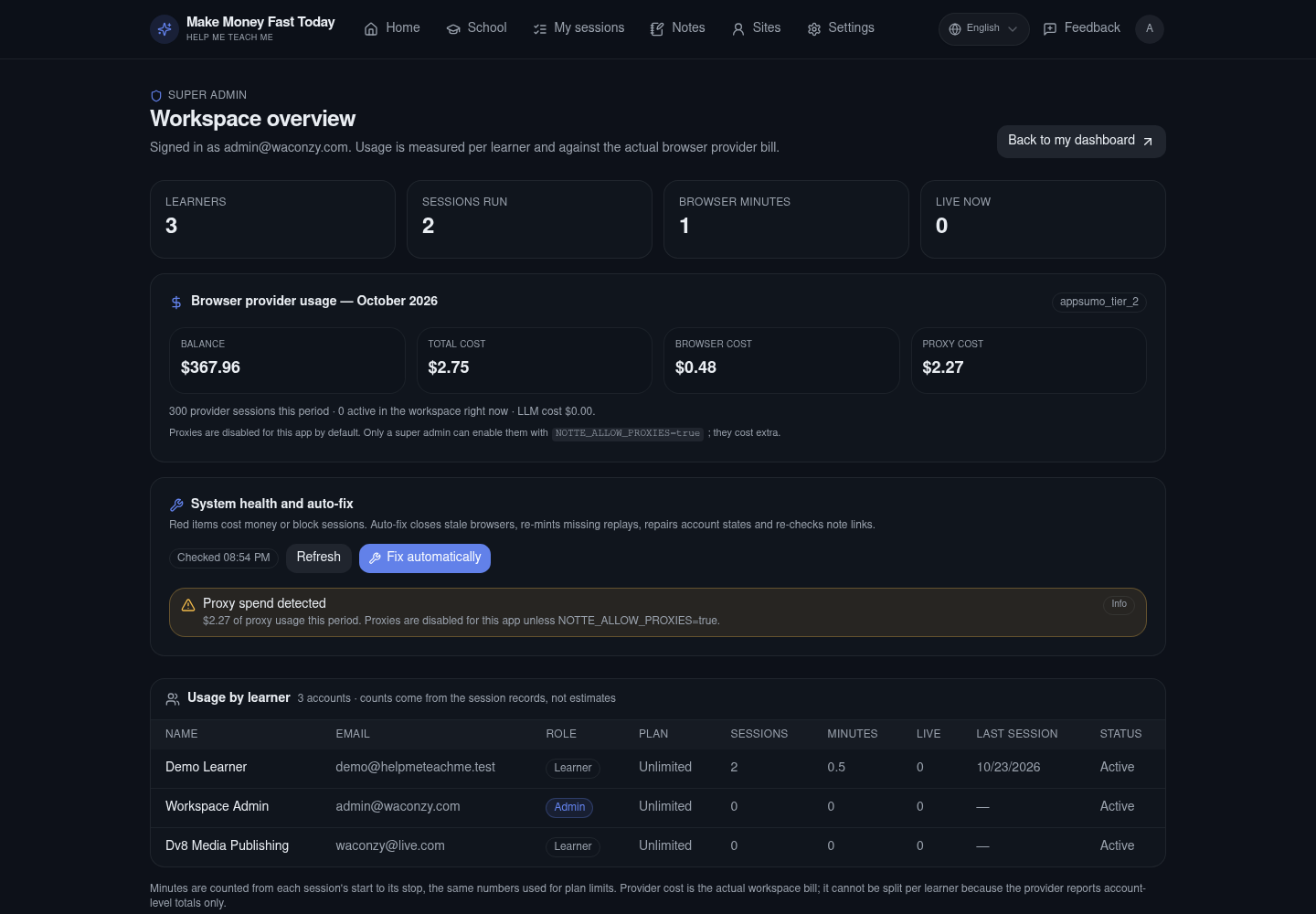
The backend, measured
Usage per learner, the real browser bill, and the auto-fix that closes stale sessions.
The part nobody says out loud
You're not lazy. You're stuck at the setup.
You have opened the same tab, read the same help page and promised yourself the same thing next week. The problem is not that you don't understand. It's that understanding has never once finished the task.
The tab you keep reopening
“I’ll cancel it this week.”
You know where the button is. You can feel the retention maze waiting. So you close the tab and let another month renew.
The thing that’s almost live
“It’s nearly ready.”
The domain is bought. The logo is saved. The listing is still a draft. ‘Nearly’ has been the status for three months.
The proof you keep postponing
“I just need to learn one more thing.”
Another video, another saved post, another notebook. Still no finished thing you can show a client, a boss or yourself.
The cost isn't the tool. It's another month of the same sentence: “I'll do it this week.”
Finish the thing that's waitingThe difference
Knowing what to do was never the problem. Doing it alone is.
Help Me Teach Me puts a competent operator in a Magic Box beside you. Describe the outcome in your own words. It researches the live web, shows you a plan with real options and prices, then teaches you each click, demonstrates it, does it with your approval, or helps while you drive.
This is not another course to finish. It is the hour you finally spend doing the thing.
Four ways to get it done
Teach me
Learn each click, in plain language, at your pace.
Show me
Watch it happen on the real page, then repeat it yourself.
Do it for me
Hand over the task with your approval at every risky step.
Helper
You drive. It answers, points and catches the trap beside you.
What this is not
- Another course you pay for and never finish.
- A chatbot that writes you another article to read.
- A stranger who takes your account and disappears.
- A script that clicks blindly and hopes for the best.
No fake completion. If a site blocks us or the task cannot be done, we stop and tell you — instead of pretending it worked.
What we do
The tasks that sit on your list for months.
Not a chatbot that gives you another article to read. A working browser with someone competent in it — who explains as much or as little as you want.
Try saying:
Stop paying for things you don't use
Cancel subscriptions, pause instead, downgrade, dispute a charge, or find the invoice you need for your books.
Get your accounts secure
Turn on two-factor, change a compromised password, recover a locked account, or finally export the data a platform holds on you.
Put a business online
Buy a domain, point it at a host, set up business email, install WordPress, add analytics, or grant a teammate limited access.
Handle the admin nobody teaches
Bookings, applications, filings, refunds, address changes, school portals — the forms that assume you already know the system.
Make money online
Skills are not the problem. Setup is.
Freelancers, marketplace sellers, musicians and creators lose weeks to the plumbing: finding real leads, configuring sending domains, getting out of the spam folder, formatting a release, fixing a listing. We do those parts live, in front of you — and record it so you can repeat them.
Find leads and clients
“The list I bought is full of dead emails.” “I don't know where to find buyers.” “My outreach is generic and gets ignored.”
We search the right directories and social networks for your exact buyer, capture the details, verify every email, and build a clean list you can actually use — with the first message drafted.
LinkedIn · Google Maps · Upwork · Fiverr · Reddit · niche directories
Build the sending machine
“SMTP, IMAP, ports… I gave up.” “My domain has no SPF or DKIM.” “New domain, and everything lands in spam.”
We set up the sending domain, mailbox and DNS records (SPF, DKIM, DMARC), check authentication, then warm the domain gradually so providers learn to trust it.
Google Workspace · Zoho · Hostinger · Cloudflare · Instantly · SalesBlink
Land in the inbox, not spam
“My tool says delivered, but nobody replies.” “Open rates collapsed.” “One bad list and my domain was burned.”
We clean and verify the list, test where messages actually land, check blacklists and authentication, send small, and watch bounce and complaint rates before scaling.
ZeroBounce · Mail-Tester · Google Postmaster · GlockApps · Smartlead
Want the whole money system, not just this setup?
12 stages: problem, offer, product, price, trust, payments, fulfilment, traffic, sales, freelancing, dropshipping and scale.
We do it for you in real time — then teach you the same move.
Every campaign, listing, release and setup happens in a Magic Box you can watch. You get the recording, the step timeline and the notes, so the second time is yours.
Turn a skill into a service
Ways to earn with the Magic Box
Use the school and assistant to learn a skill, build a small proof project, then offer a clearly scoped service or product. These are paths to test, not promises of income. Start with a real customer problem and keep costs low until demand is proven.
01 · Learn
Choose one useful skill and practise it.
02 · Prove
Build a sample and check it with real people.
03 · Offer
Set a clear scope, price and delivery promise.
Example paths to explore
Bars are illustrative categories, not market size, earnings or success probabilities.
Explore Money SchoolWhere people make money
One assistant for every place you earn.
Not a shortlist. If a person can do it in a browser, we can walk you through it — including sign-ups, listings, payouts, uploads and the settings behind them. For music: prepare the lossless master and artwork, upload to DistroKid, Symphonic, Vydia, Awal or Royalti, claim artist profiles, and leave the social copyright programmes off.
Freelance & marketplaces
- Fiverr
- Upwork
- eBay
- Etsy
- Amazon Seller
- Shopify
- Gumroad
- Payhip
Social media
- TikTok
- YouTube
- X
- Threads
Music distribution
- Spotify for Artists
- Apple Music for Artists
- DistroKid
- TuneCore
- Symphonic
- Vydia
- Awal / The Orchard
- Royalti
- Bandcamp
Business & payments
- Stripe
- PayPal
- Wise
- Google Workspace
- Cloudflare
- Zoho
- Notion
- Calendly
Site names are examples of where our learners work. No partnership or affiliation is implied.
Sell your skills
Set up the profile, write the gig, price it, publish it, and answer the first buyers — on camera.
Sell products
Photograph, title, price, ship and handle returns on eBay, Etsy, Amazon or your own store.
Release and monetize music
Prepare lossless audio and 3000px artwork, upload to DistroKid, Symphonic, Vydia, Awal or Royalti, fix metadata and splits, claim Spotify and Apple artist profiles — and keep every social copyright or content-ID option off.
Before anything opens
You approve a real plan first.
Most tools jump straight into automating. We stop at the part that actually matters: understanding the task, the requirements and the cost.
- What I understood you want — in one sentence, so you can correct me.
- What I need from you, and why — a short checklist, not a wall of forms.
- Three or four real options, with prices and billing terms where confirmed on the provider page.
- My recommendation with a one-line why, plus a cheaper and a premium alternative.
- What happens next, and how long it should take.
Prices are read from the live web with the date they were checked. Anything that cannot be verified says “price not confirmed” and links the provider page. We never invent a number — and nothing is paid inside this app.
Your brief
Set up a business email on my domain
What I understood
You own a domain and want a professional address on it, without moving your whole website.
What I need from you
- • Your domain name — so I point the right records
- • A mailbox name — e.g. hello@
- • A budget — so I don't suggest something you can't afford
Options compared
My recommendation
Mailbox on your host — least change, lowest cost, everything stays in one place. Cheaper: a free alias. Premium: Google Workspace.
How it works
From “I don't know where to click” to done.
Four steps, no jargon, and a stop button at every stage. Everything is recorded so you can rewatch the exact clicks later.
Say it in your own words
Typos and half-finished sentences are fine. “Stop Adobe charging me”, “turn on 2FA”, “get my Instagram data”, “put my domain on my new site”. I work out the site and the real goal.
Get a brief, not a guess
Before anything opens, you see what I understood, what I need from you, three or four real options with live prices where they can be confirmed, and my recommendation. Nothing is invented.
Approve, then choose your mode
Teach me, show me, do it for me, or helper. Switch at any moment without starting over. A 120-minute Magic Box opens with the learner in control of the last click.
Keep the proof and the lesson
Every session keeps a step timeline, screenshots and a replay. Your notes stay editable, and completed runs can be saved as your own lessons.
Four ways to get there
You choose how much we do.
A lesson can become a demonstration, or a demonstration can become “just do it” — without starting over. The Magic Box is always yours to take back.
Teach me
A hands-on lesson. I lay out a numbered plan, tell you exactly where to look, and wait while you do it. Stuck for 75 seconds? A hint appears, and you can ask me to demonstrate just that step.
Show me
I perform the task in the Magic Box and narrate every move while you watch. The Magic Box stays view-only so nothing gets clicked by accident — take over whenever you like.
Do it for me
I complete the whole task, stop for your approval before anything destructive or paid, then finish with a proof screenshot and a plain-language report of what changed.
Helper
You drive. I watch the page beside you and answer questions in the chat — “what do I click?”, “why is it asking for my ID?” — and I can take over just the bit that is blocking you.
Why it works
Capable on the hard parts. Careful on the sharp ones.
Any website. Not a shortlist.
Recipes are shortcuts, not limits. If a person can do it in a browser, ask for it — even when it spans several sites, like buying a domain and pointing it at your host.
Researched before it acts
Live search plus real provider pages, so the options, requirements and prices are current. Unconfirmed prices are labelled, never guessed.
Your passwords stay yours
You log in yourself in your own Magic Box profile. We never ask for your password, and the AI never types card numbers, bank details or government ID.
A record you can rewatch
Screenshots for completed steps, a replay after every session, and notes you can edit, pin and add your own links to.
Built for real tasks, not demos
Sessions run up to two hours with a keepalive while you watch. Leave for three minutes and the Magic Box closes itself to protect your account.
Your language, start to finish
Steps, chat and spoken narration in 20+ languages — including plain language for people who have never been taught any of this.
School
Learn it once. Keep the skill.
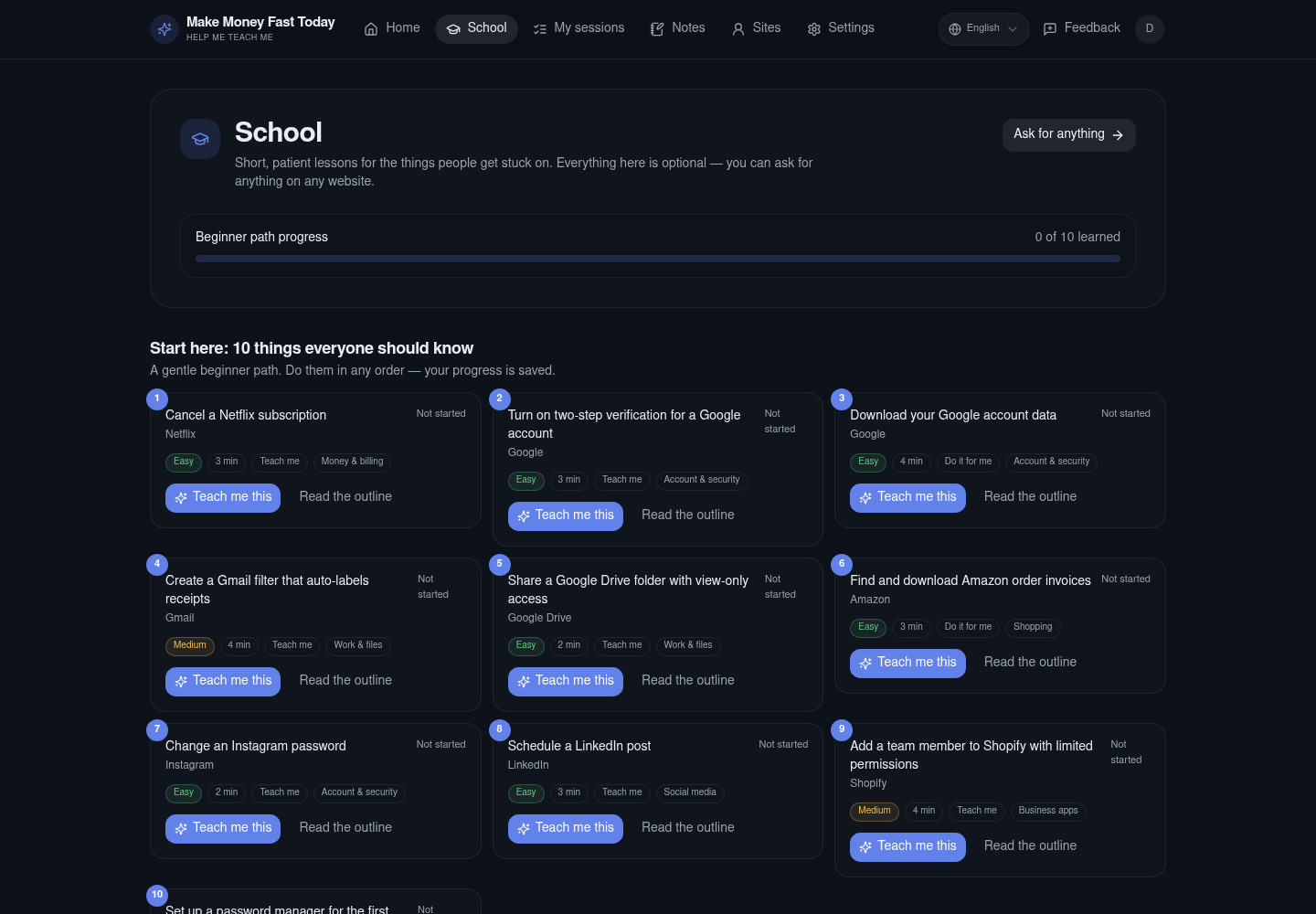
A beginner path for the things nobody teaches — plus short lessons for the tasks people put off. Each lesson shows its outline, difficulty and how long it takes. Your progress is saved per lesson.
Cancel a subscription
Easy · 3 min · Teach me
Turn on two-step verification
Easy · 4 min · Teach me
Download your account data
Easy · 5 min · Do it for me
Point a domain at a new site
Medium · 6 min · Show me
Beginner path: 10 things everyone should know
Subscriptions, passwords, two-factor, data exports, sharing files safely, and more — in plain language.
Safety floor
Private by design, not by promise.
Every learner gets their own persistent Magic Box profile. Your logins stay inside it, and the AI is built to step back at exactly the moments that matter.
- You log in yourself in the Magic Box — we never see or store your password.
- Card numbers, bank details and government ID are always typed by you, never by us.
- Money is never moved for you.
- CAPTCHAs and identity checks are handed to you in the Magic Box.
- Nothing destructive or paid happens without your explicit approval.
It also refuses anything unlawful, fraudulent, impersonating or spammy. Everything else is in scope.
A session that never cuts you off mid-task
Sessions run up to 120 minutes with a keepalive while you are watching. Leave for three minutes and the browser closes itself. Finish and it stops automatically a minute later, saving the recording.
120
minutes max
60s
keepalive
1
private profile
Tutorial studio
Make the tutorial while you do the task.
Turn any session into a website how-to video, a SaaS product tour, a course lesson or a customer onboarding walkthrough. The step timeline, screenshots and replay are already there — add your voice, publish, and keep the MP4.
Website how-to videos
Show the exact page, the exact click and the result.
SaaS tutorials
Demo a product flow with a narrated, step-by-step recording.
Course lessons
Export a lesson with steps, screenshots and a video.
Customer onboarding
A recorded walkthrough a new user can follow alone.
Every session becomes content
- Downloadable MP4 of the whole session
- Numbered steps with screenshots
- Links and click targets for every step
- Editable notes and a replay page
- 20+ languages and spoken narration
- Works on any website a person can use
Perfect for creators, course sellers, SaaS marketers and support teams. You can also ask us to make the tutorial for you — we do the task live and hand you the video.
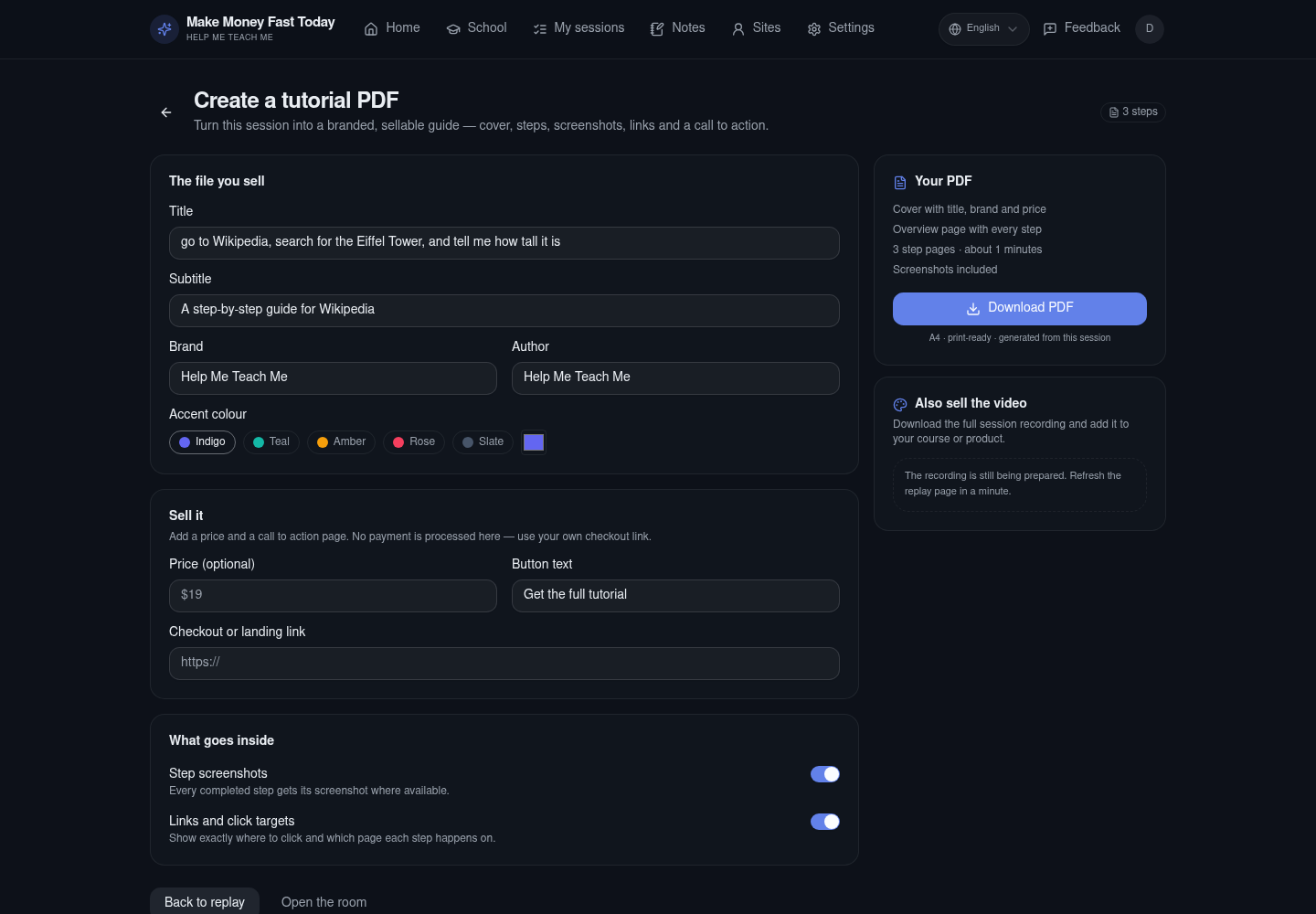
Turn the session into a sellable PDF
Customize the cover, brand, colour, screenshots, price and checkout link. Download the PDF and the video together.
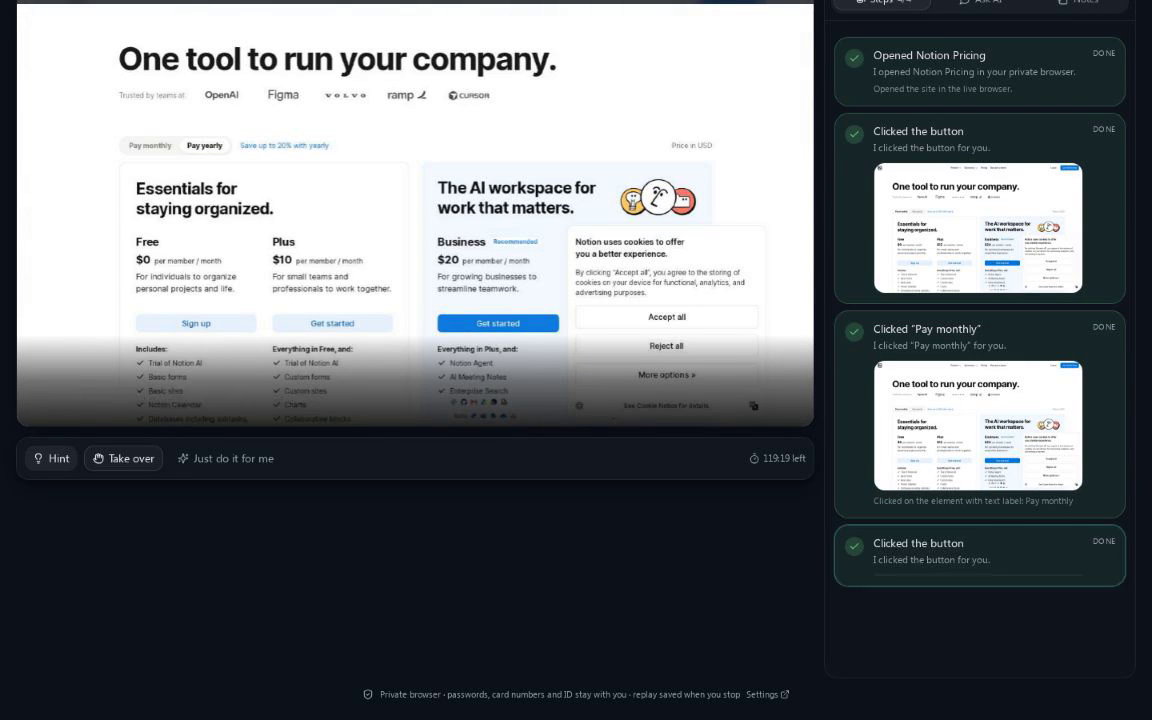
Every click becomes a lesson step
Screenshots, click targets and page links are captured as the Magic Box works — ready for a course or a support article.
Build the product behind the tutorial.
Our build stack is centered on Teable.ai: database, API, automations and app building in one place. Create your account through our partner link for 10% off, then start a build session and we will teach you the platform — or build it with you while you are logged in.
Never share your platform password. You log in yourself in the Magic Box; we never see it.
Build
Software, web apps and phone apps — with a guide beside you.
Go beyond tutorials. Build a web app, a mobile app, a SaaS product or an internal tool with the same live help: researched plan, Magic Box, steps and links, and a recording you can keep.
API guidance, free-tier notes and account setup are covered in the build guide. If a person can use it in a browser, we can teach it, record it, or do it with you.
Launch Studio
Build the app. Prepare every store.
Plan a web app, Android app, iPhone app or cross-platform product, then track the build, assets, signing and store submission in one place — Google Play, Apple, Samsung, Amazon, Huawei, Microsoft, F-Droid and direct APK.
Lead Finder
Find the people worth talking to.
Generate free Google dorks for local businesses, Instagram, YouTube, playlist curators and press. Enrich public websites, verify the contact and keep consent attached to every lead.
Google dorks
Public contact pages, creators, curators and editors.
Maps
Local businesses with public websites and phones.
Social profiles
Public business emails from Instagram and YouTube.
Enrich and save
Read public contact pages; no private data or bulk blasting.
Credit, legal, immigration and life admin
The paperwork that can change your life.
Pull the three credit reports, compare every account, mark what is inaccurate and prepare a factual dispute. Research the official legal route, organise evidence and find the right help. Renew a passport, compare insurance, move house or apply for benefits — with 250 concrete tasks in one place.
Credit reports and disputes
Equifax, Experian and TransUnion; factual disputes and a clear evidence trail.
Legal research and evidence
Official routes, court forms, demand letters and consumer complaints — not legal advice.
Immigration and relocation
Visa, work, study, family and residency research using official government sources.
Life admin, done
Passports, insurance, moving, school, care and the deadlines nobody explains.
We do not guarantee a credit-score increase, removal of accurate information, a visa, or a legal outcome. We research public sources, prepare questions and hand the final legal or financial decision to a qualified professional where needed.
Word Trainer
Hide the word in your heart.
Bible verses and Quran passages for faith, fear, love, peace, strength, forgiveness, guidance and hope. Read, listen, chunk it, remove one word at a time, recall the first letters, then speak or type the whole verse.
Bible
KJV verses across love, courage, peace, faith, forgiveness and hope.
Quran
Short passages with Arabic, transliteration and meaning; verify recitation with a teacher.
Memory drills
Chunking, progressive word removal, first-letter recall and voice practice.
Dating & Connection
Connection is a skill. Practice it honestly.
For men, women and everyone: honest profiles, specific first messages, real conversation, asking for the next step, safe dates, clear consent, red flags, quizzes and voice drills. No manipulation, no pressure, no fake confidence.
Languages
Learn any language. Speak it, don't just tap it.
Choose from 22 languages or type any language you want. Beginner words, intermediate phrases and expert sentences with listening, speaking, typing, spaced review and quizzes.
Pricing
Plans from $58 to $1,998 a month.
Plans are monthly. You see and approve the exact amount in hosted checkout before anything is charged.
Starter
Start here$29.00 first month
$58 then $58/mo · 50% off
1 seat · 30 sessions · 600 min
- All four modes
- Video download
- Tutorial studio
- All modules · all 250 tasks
- Social, leads, launch and credit/legal
Growth
Most popular$79.00 first month
$158 then $158/mo · 50% off
3 seats · 100 sessions · 2,000 min
- All four modes
- Video download
- Tutorial studio
- All modules · all 250 tasks
- Social, leads, launch and credit/legal
Pro
For teams$149.00 first month
$298 then $298/mo · 50% off
5 seats · 250 sessions · 5,000 min
- All four modes
- Video download
- Tutorial studio
- All modules · all 250 tasks
- Social, leads, launch and credit/legal
Agency
For agencies$399.00 first month
$798 then $798/mo · 50% off
15 seats · 750 sessions · 15,000 min
- All four modes
- Video download
- Tutorial studio
- All modules · all 250 tasks
- Social, leads, launch and credit/legal
Enterprise
Best value$999.00 first month
$1,998 then $1,998/mo · 50% off
50 seats · Unlimited fair use
- All four modes
- Video download
- Tutorial studio
- All modules · all 250 tasks
- Social, leads, launch and credit/legal
Plan prices are monthly and billed in USD. You approve the exact amount in hosted checkout before any charge. Every plan includes all modules; seats, sessions and minutes are the difference.
Referral program
Share the help. Earn 30% for life.
Join, add PayPal or a crypto wallet, and get a tracked link plus a discount code. Referrals are remembered for 60 days, and every payment they make earns 30% for as long as they stay subscribed. Payouts are reviewed every 30 days.
Questions people ask
Questions people ask
What is Help Me Teach Me, exactly?+
A Magic Box with a patient AI beside it. You say what you need help with; it researches the task, shows you a plan with real options and prices, then teaches you, demonstrates it, does it for you, or helps while you drive.
Do you see my passwords?+
No. You type them directly into the Magic Box. We never ask for them and we cannot read them from the page. The AI is built to stop and hand you the Magic Box whenever a password, card, bank or ID field is needed.
Is this only for the lessons on the site?+
No. The school is a set of shortcuts for common tasks. Anything a person could do in a browser is in scope — including multi-site jobs like registering a domain, connecting it to a host and installing a website.
How do the prices work?+
The brief compares real providers using pages we read on the live web. A price is shown with its billing term and the date it was checked. If a price cannot be confirmed, it says “price not confirmed” and links the provider page — we never invent a number.
What can't it do?+
It will not help with anything unlawful, fraud, impersonation or spam. It will not type your card, bank or government ID, move money, or solve a CAPTCHA or identity check for you. Those parts are always handed back to you.
What happens when the session ends?+
The Magic Box closes, the recording and step screenshots are saved, and you get a replay plus editable notes. Your logins stay in your private profile, so the next visit is faster.
Can you guarantee the task will be done?+
No — and you should not trust anyone who promises 100% on other people's websites. Sites change, block automation, or require a human check. What we do commit to: a real plan before anything opens, the actual page in front of you, a stop-and-hand-over whenever a human is required, and an honest record of what happened. If it cannot be done, we tell you instead of pretending.
Can I download the session video?+
Yes. Every session has a replay page with a Download video button, so you keep the recording. The demo on this page is itself a downloadable video, recorded live.
How is this different from Scribe, Tango or Guidde?+
Scribe and Tango capture a process into a guide after you do it. Guidde generates how-to videos from a capture. Help Me Teach Me works in a Magic Box while the task is happening: it can teach you each step, demonstrate it, do it for you, or help while you drive — on any website, with the learner keeping control of their own logins. Every session also produces a downloadable recording.
Can you help me get clients, set up email or release music?+
Yes. We build verified lead lists, set up sending domains with SPF, DKIM and DMARC, warm them up, check inbox placement, and launch campaigns. We also set up Fiverr, Upwork, eBay and Etsy listings, upload releases to distributors, and claim Spotify for Artists and Apple Music for Artists profiles.
One session from now
You already know what needs doing.
The subscription is still renewing. The listing is still a draft. The launch is still next month. Pick the one task you keep postponing — we'll research it, show you the plan, and do it with you. This is the week it stops being “almost”.
No card to start. You log in yourself in the Magic Box — no password sharing.
Questions first? admin@waconzy.com
Prefer to talk? Call us on WhatsApp.
Tap the button and your own WhatsApp dials us — say what you are stuck on and we tell you how we would do it.
+52 984 137 4687
or message instead
Social Studio
Your social work, in one Magic Box.
Set up new accounts, plan replies and DMs, find the right leads and keep every task in one place. You sign in yourself; nothing is posted or sent until you approve it.
Create and organise accounts
Platform-specific setup plans, profile details and verification steps.
Reply, post and DM
Draft the action, then do it with help in the Magic Box and approve the send.
Find and track leads
Save people you found, record consent and keep follow-ups from getting lost.